By Unflag Team
How to Humanize AI Generated Text Without Losing Meaning
Learn how to humanize AI generated text with proven techniques, real before and after examples, and a workflow that preserves facts, voice, and accuracy.
You've got a draft that sounds clean on the surface, but every paragraph still feels like it was assembled from the same template. Maybe you pasted it into a detector, saw an ugly score, and tried swapping a few words. That usually changes the paint, not the structure.
How to humanize AI generated text starts with one hard truth, the fix is editorial, not cosmetic. A good rewrite changes voice, rhythm, and reasoning, then verifies that the meaning still matches the source. If you want a faster path, Unflag's AI Humanizer can handle the structural rewrite in one pass, then you can check the result against your own draft.
Table of Contents
- Why Most Humanization Attempts Still Read Robotic
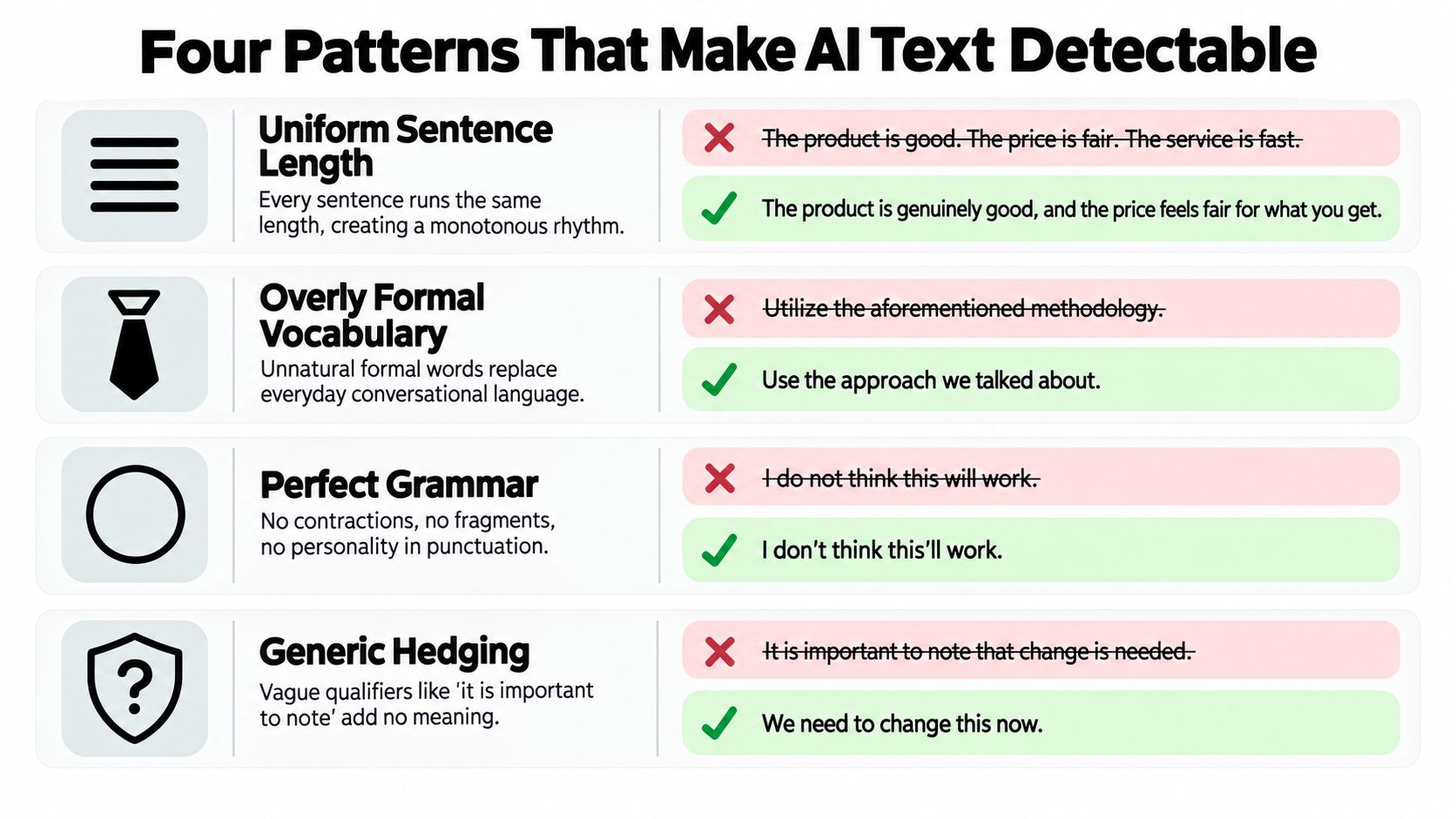
- The Four Patterns That Make AI Text Detectable
- A Staged Editing Workflow That Works
- Manual Editing vs Humanizer Tools vs Detectors
- The Verification Pass That Protects Your Sources
- Why Detector Scores Are Not the Finish Line
- Frequently Asked Questions About Humanizing AI Text
Why Most Humanization Attempts Still Read Robotic
The failure mode is structural, not lexical
A flagged draft usually fails because the writer only changed words, not patterns. Swap the corporate verb for a plain one, trim a sentence, and the paragraph can still sound machine-made because the cadence, transitions, and information density stay the same.
Readers notice that fast. In a 2025 study of medical-student essays, human participants correctly identified AI-generated versus human-written passages in 48 of 69 rounds, an overall accuracy of 70%, with medical experts at 72% and humanities experts at 65% (study). Polished wording does not erase the deeper tells.
What readers notice before they know why
Robotic drafts usually share the same four habits, predictable transitions, uniform sentence length, generic phrasing, and low information density. A paragraph can look correct and still feel airless because every sentence does the same job in the same way.
Practical rule: if a paragraph could belong to any topic, it probably needs structural editing, not another synonym pass.
That is where a one-off rewrite falls short and a real workflow starts. AI text often needs a new point of view, not just cleaner wording, and the fastest way to get there is to revise for voice first and polish second. If you want a tool that rewrites AI copy with that structural focus, Unflag's AI Humanizer is built for that kind of pass.
The Four Patterns That Make AI Text Detectable
Use this as a pre-edit scan
Start by reading the draft as an editor, not a writer. Mark any paragraph that leans on the same transition words, the same sentence length, or the same vague claims without concrete detail.
A fast diagnostic looks like this:
- Predictable transitions: “however” and “in addition” show up because they're safe, not because they fit the argument.
- Uniform sentence length: every line lands with the same rhythm, so the prose never speeds up or slows down.
- Generic phrasing: the draft could describe any product, article, or policy because it never commits to specifics.
- Low burstiness: sentence complexity barely changes, which makes the whole piece feel machine-smoothed.
If a paragraph hits two or more, it usually needs structural rewriting. A synonym swap won't fix a paragraph that is organized like a template.
Why the rhythm matters
Turnitin's technical documentation says perplexity and burstiness are only partial signals, and that long-range statistical dependencies also help distinguish human and language-model writing (technical documentation). That lines up with what editors see in practice, the problem isn't one word, it's the pattern across the paragraph.
Use the checklist like you'd scan subtitles on a transcript. Once you can spot the pattern, the fix becomes obvious, break the rhythm, add specificity, and change the order of ideas. For a related checklist on spotting machine-like phrasing, see this internal guide on signs of AI writing.
A Staged Editing Workflow That Works
Step 1 through 3, rebuild the draft's spine
Start by answering three questions: who is this for, what does it need to prove, and what should the reader do next. Once that is clear, fix the paragraph order before you touch individual sentences.
Here is the order I use on client drafts:
- Define purpose and audience. A student essay, a sales page, and a technical explainer need different levels of certainty and detail.
- Rework the paragraph flow. Move the strongest point earlier, cut repeated setup, and group ideas that belong together.
- Vary sentence length and information density. Let one sentence carry the point, then let the next add context or contrast.
That order matters because AI detectors and readers both respond to structure. If the draft still moves in the same predictable shape, it will still sound machine-made even after a pile of word-level edits.
A before-and-after edit that keeps meaning intact
Robotic version: “AI-driven content creation helps businesses improve efficiency, streamline communication, and deliver consistent messaging across channels. By using the right approach, teams can optimize results and maintain quality at scale.”
Human version: “AI can save time, but it also makes copy sound flat if nobody edits for voice. The better move is to use it for the first draft, then rewrite for tone, audience, and the one detail that proves you know the topic.”
The second version says less in some places and more in others. That is the point. It sounds like a writer making choices, not a system filling slots.
Useful edit habit: replace a generic transition with the reason the next sentence exists. That one change does more than most synonym tools.
For the tone-tightening pass, Unflag's Paraphrasing Tool keeps meaning close to the source while you adjust register.
Manual Editing vs Humanizer Tools vs Detectors
Pick the tool that matches the task
You don't need the same workflow for every draft. A student paper, a blog post, and a client report don't have the same risk profile, so the best tool depends on whether you're protecting voice, speed, or factual accuracy.
| Tool | What it does best | Main limitation | Starting price |
|---|---|---|---|
| Manual editing | Preserves author voice and intent | Slow, especially on long drafts | Free |
| Unflag | Humanizes, rewrites, detects, and fact-checks in one place | Still needs a human final read | Free to start |
| Grammarly paraphraser | Convenient inside an existing editor | Mainly helps with phrasing and readability | Varies by plan |
| GPTZero-style detectors | Screens text for likely AI patterns | Scores can disagree and don't prove authorship | Varies by plan |
Unflag is the only option in this group that combines humanizing, rewriting, detecting, and fact-checking in one place. It also offers native iOS and Android apps and a free start, with Unflag Plus at $45.99 per year on the yearly plan (comparison context). That doesn't remove the need for judgment, but it does keep the workflow in one place.
What each option misses
Manual editing usually protects nuance best, but it takes time. Detectors are useful as screening signals, yet they don't reliably settle authorship on their own. Grammarly is convenient if you already live in that editor, but it won't verify whether a claim still holds after the rewrite.
The right question isn't which tool sounds smartest. It's which one helps you preserve meaning while changing the draft enough that it reads like a person wrote it.
The Verification Pass That Protects Your Sources
A cleaned-up draft can still lose meaning
I've seen a rewrite come back smoother and still wrong. A citation disappears, a hedge turns into certainty, and the draft sounds better while becoming less trustworthy.
Verification has to happen after the humanizing pass. Published testing found that machine paraphrasing raised one detector's human-written score from 0.02% to 99.52% for one essay and from 61.96% to 99.98% for another, even though AI paraphrasing can still remain identifiable to combined detection systems (study). A passing detector score means little if the rewrite dropped meaning along the way.
The four checks that catch damage fast
- Check citations. Confirm every fact still points to the same source.
- Restore hedges. Put back qualifiers if the original claim was careful, conditional, or uncertain.
- Compare drafts. Line up the original and the rewrite to catch lost numbers, altered names, or changed scope.
- Read aloud. Listen for overconfidence, awkward transitions, or places where the writer's voice vanished.
A fact-checking pass is easier when the review step sits close to the rewrite. I use this guide to fact-checking tools as a quick way to catch claims that became too bold, too vague, or unsupported before anything goes live.
Rule of thumb: if the rewrite sounds smoother but your sources no longer match, the draft got worse, not better.
Why Detector Scores Are Not the Finish Line
A score is a signal, not a verdict
People get stuck chasing a lower AI score because it's measurable. The problem is that the number can be misleading in both directions, which means a “good” score doesn't prove authorship and a “bad” score doesn't prove cheating.
An independent evaluation found overall AI-detection accuracy of only 27.9%, with the best tested tool reaching 50%, while human-written-text detection approached 83%; Turnitin also states its AI indicator can produce false positives, with a higher incidence near the start or end of documents (evaluation). NIST's 2024 Generative AI Pilot Study also found that detector performance still had room for improvement (NIST report).
Build a process you can show
An auditable workflow beats a mystery score. Save outlines, keep earlier drafts, note your sources, and disclose AI help where your school, publisher, or client requires it.
That matters more for multilingual writers and people using grammar assistance, because uniform or heavily edited prose can draw attention for the wrong reasons. If your process is visible, the conversation shifts from suspicion to documentation.
What editors trust is the trail, not the percentage.
Frequently Asked Questions About Humanizing AI Text
Can AI text be detected after humanizing it
Yes, sometimes. Humanizing a draft removes obvious machine patterns, but detectors still vary by tool, genre, and how much the text was changed. Readers can also spot writing that sounds flattened or over-edited even after paraphrasing.
Is humanizing AI text considered cheating
That depends on the setting. Schools, publishers, and employers set different rules, and UNESCO recommends human oversight, accountability, and original judgment in AI-assisted work (guidance). If disclosure is required, disclose the assistance and verify the final text rather than hiding the process.
Will non-native English writers get falsely flagged
They can. A polished, uniform draft may look machine-like even when the ideas are fully human, especially after grammar tools remove natural variation. Keep version history, notes, and source trails so you can show how the draft was shaped.
What should I check after rewriting AI text
Compare the original and revised drafts line by line. Check claims, numbers, named entities, citations, scope, and any hedged language that got tightened too far. Then read it aloud and confirm the voice still sounds like the writer, not just cleaner prose.
Does paraphrasing alone make text sound human
Usually not. Paraphrasing changes vocabulary, but the underlying structure can still feel synthetic. Restructure the argument first, then adjust tone, then verify that the meaning stayed intact and the citations still support the claims.
Are detector scores useful at all
Yes, as a screening signal. They help you decide which drafts need a closer look, but they are not proof of authorship. The safer workflow combines detector output with draft history, source notes, and human review.
What's the fastest safe workflow
For a 1,000-word draft, budget about 15 minutes for a structural pass and 10 minutes for citation and hedge checks. That order catches most damage before submission because you fix the argument before polishing the surface. If you want a tool step in the middle, use Unflag as a rewrite aid, then keep the original open while you verify meaning, citations, and tone.
More guides
View allAI Content Detector: How It Works and What Your Score Means
Learn how an AI content detector scores text, why results vary, and what limits to expect. Practical guidance for interpreting detector output in 2026.
10 Best AI Text Rewriter Free Tools for 2026
Compare the best AI text rewriter free tools for 2026, with word caps, privacy limits, before-and-after examples and tips for reliable rewrites.
Paraphrasing Tool Free: 10 Options Compared for 2026
Compare the best paraphrasing tool free options on quality, languages and privacy. See limits, pros and cons, and where Unflag fits in 2026.
10 Best AI Essay Rewriter Tools for Students in 2026
Compare 10 AI essay rewriter tools for tone, structure, originality, and fact-checking, with student examples and an honest Unflag review.